
It’s easy to spend money on social media ads. It’s much harder to get it back. Many small businesses boost a few posts, see likes but no sales, and decide ads “don’t work.”
Usually the platform isn’t the problem. The setup is: a vague goal, the wrong audience, copy that gets cut off, a landing page that doesn’t match the ad, or a budget too small for the algorithm to learn.
These 9 social media ad tips cover the decisions that make the biggest difference, from choosing your objective to testing creative, with the current platform guidelines you need to get the basics right.
Pick one goal and the matching campaign objective, target a clearly defined audience, stop the scroll with mobile-first creative, keep the key message within the platform’s visible text, and send people to a landing page that matches the ad. Track conversions properly, give the campaign enough budget to learn, and test one change at a time.
Table of Contents
1. Start With One Goal and the Right Objective
Every ad platform asks you to pick an objective, such as awareness, traffic, leads, or sales. The platform then shows your ad to the people most likely to take that action. Choose the wrong one and the algorithm will happily deliver the wrong result.
- Want sales from an online store? Use a sales or conversions objective, not traffic.
- Want email sign-ups or enquiries? Use a leads objective.
- Launching something new to a cold audience? Awareness or video views can warm people up first.
Write your goal down as a number before you start: “20 consultation bookings in March at under $40 each.” That makes every later decision easier.
2. Define Your Audience Clearly
Most platforms let you target by location, age, interests, and behaviour, plus your own data. The most useful audiences for small businesses are usually:
- Retargeting: people who visited your website, watched your videos, or engaged with your page. They already know you, so they convert more easily.
- Customer lists: upload past customers (with consent) to exclude them from new-customer offers or to build lookalike audiences.
- Lookalike or similar audiences: new people who resemble your best customers.
- Broad targeting: on platforms with strong algorithms, like Meta, a broad audience plus good creative often performs well once conversion tracking is set up.
In the US, ads about housing, employment, and financial products such as credit fall into Meta’s special ad categories, which limit targeting options. Check the rules before you launch if your business is in one of those areas.
3. Stop the Scroll With Mobile-First Creative
Your image or video is what people notice first. Design for a phone screen:
- Use vertical or square formats rather than wide landscape images.
- Show the product or result in the first seconds of a video.
- Add captions to videos. Many people watch with the sound off.
- Keep text on images short and readable.
- Use real photos of your product, team, or customers (with permission) rather than generic stock images.
4. Write Ad Copy for the Cut-Off
On Meta (Facebook and Instagram), the recommended length is about 125 characters for primary text, 40 characters for the headline, and about 25 to 30 for the description. Longer primary text is allowed, but the feed hides it behind “See more,” so your hook and offer must come first.
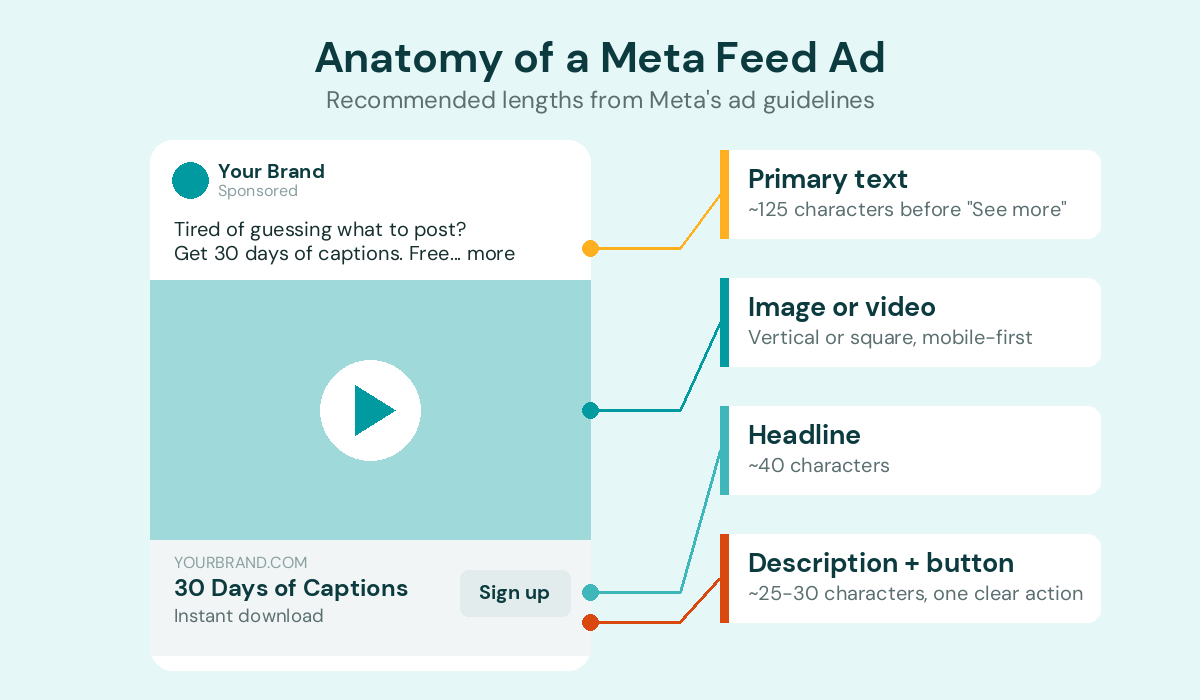
A simple structure for the primary text:
- Hook: name the problem or the result. “Tired of guessing what to post?”
- Offer: what they get. “Get 30 days of ready-to-use captions.”
- Proof or reason to act now: “Used by 900+ small businesses” (only if true) or “Free until Friday.”
For more on writing persuasive copy, see our ultimate guide to copywriting and social media copywriting tips.
5. Make One Clear Offer
An ad with three offers gets fewer clicks than an ad with one. Choose a single offer and a single call-to-action button that matches it: “Shop now” for products, “Book now” for appointments, “Sign up” or “Download” for lead magnets.
A good offer gives people a reason to act today: a first-order discount, a free consultation, a free trial, or a useful freebie.
6. Match the Ad to the Landing Page
If your ad promises “20% off running shoes” and the click lands on your homepage, many people leave. The page should repeat the ad’s headline and offer, load quickly on mobile, and make the next step obvious.
Check your landing page on your own phone before you spend a dollar. Slow pages and confusing forms waste ad budget faster than weak ads.
7. Set Up Conversion Tracking First
Without tracking, you’re guessing. Install the tracking tools for each platform you advertise on before launch:
- Meta: Meta Pixel plus the Conversions API
- TikTok: TikTok Pixel
- LinkedIn: LinkedIn Insight Tag
- Google: Google Ads conversion tracking and Google Analytics
On WordPress, plugins like PixelYourSite (free and paid versions) can install several pixels without code. Shopify has built-in connections for Meta, TikTok, and Google through their sales channel apps. Update your privacy policy to list these tools. Our guide to important pages for your website explains what to include.
8. Give the Algorithm Enough Budget to Learn
New Meta ad sets go through a learning phase. As a general benchmark, an ad set needs about 50 optimization events within 7 days to leave it and stabilise delivery. Results during learning are usually less predictable.
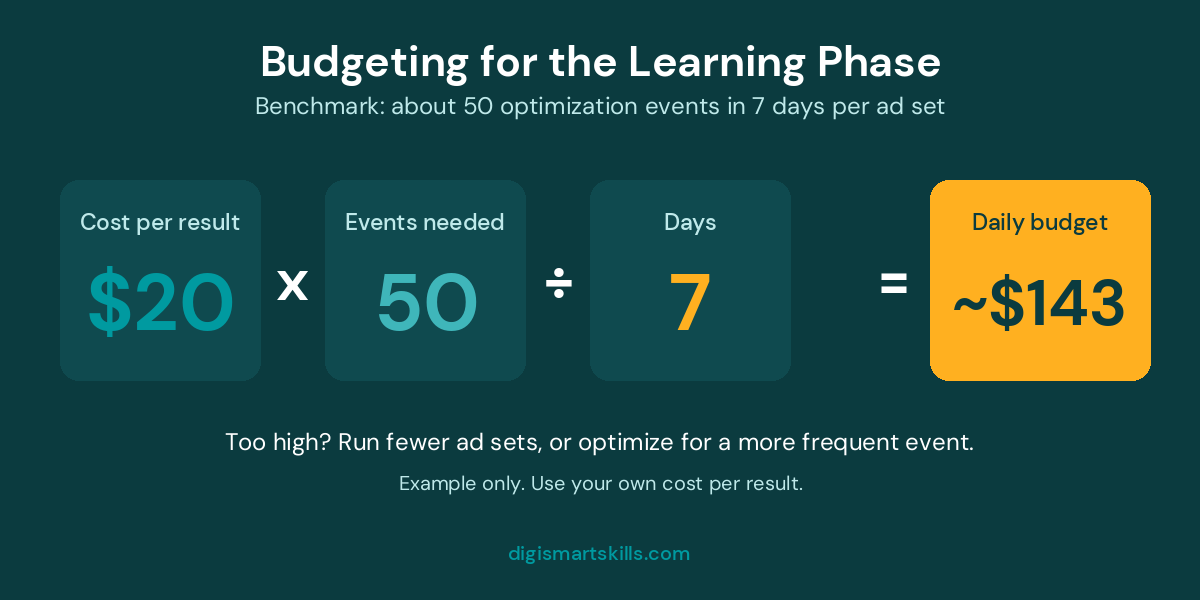
You can use that benchmark to estimate a daily budget: (cost per result × 50) ÷ 7. If a lead costs you about $20, that’s $1,000 over a week, or roughly $143 a day for one ad set.
If that’s more than you can spend, don’t spread a small budget across many ad sets. Run fewer ad sets, or optimise for a more frequent action (like “add to cart” instead of “purchase”) until you have more data.
9. Test One Thing at a Time
Testing is how good ads become great ones. Change one variable per test so you know what made the difference:
- Two hooks with the same image
- Two images with the same copy
- Two offers, such as a discount vs. free shipping
Give each test enough time and budget to produce meaningful results, and avoid editing live ad sets every day. Significant changes, like big budget jumps or new creative, can send an ad set back into the learning phase.
Which Social Media Platform Should You Advertise On?
- Facebook and Instagram: broad reach and strong targeting for most consumer businesses, local services, and e-commerce.
- TikTok: short, native-style video for products that are easy to show, especially for younger audiences.
- LinkedIn: B2B services, software, recruiting, and professional training. Usually more expensive per click, but with precise job and industry targeting.
- Pinterest: planning-led categories like home, recipes, fashion, weddings, and crafts.
Start where your customers already spend time and where you can produce the right type of creative. One platform done well beats four done badly.
Frequently Asked Questions
How much should a small business spend on social media ads?
There’s no single right number. Work backwards from your goal and your cost per result, and use the learning phase benchmark to check whether your budget is realistic. Start small enough that you’re comfortable losing it while you learn, then scale what works.
How long does it take to see results from social media ads?
Expect at least a week of data before judging an ad set, and often longer for sales. Early results during the learning phase can swing a lot, so avoid big changes after just a day or two.
Is boosting a post the same as running an ad?
Boosting is a simplified ad with fewer options. It’s fine for extra reach on a good post, but Ads Manager gives you proper objectives, targeting, testing, and conversion tracking.
Should I run ads myself or hire someone?
You can learn the basics yourself with a small budget. Once you’re spending more each month, an experienced freelancer or agency can often save more than they cost. Ask for results from similar businesses before you hire.
Launch Smarter, Not Bigger
Successful social media ads don’t start with a big budget. They start with one goal, a clear audience, creative built for phones, copy that works within the cut-off, a matching landing page, and proper tracking. Then you test, learn, and scale what works.
Before your next campaign, go through these 9 social media ad tips as a checklist. Fixing just one weak link, like tracking or the landing page, can change your results.
Join the DigiSmart Skills newsletter for step-by-step tips on social media ads, copywriting, and growing your business online. Learn. Build. Grow.