A reader lands on your blog for the first time. Before they trust your advice, they look for a few things: who’s behind the site, how to reach you, and whether you’re being paid to recommend what you recommend. If they can’t find those answers, many of them leave.
Google looks for the same signals, and so do ad networks and affiliate programs. Google AdSense, for example, requires every publisher to clearly display a privacy policy. That’s why the right pages matter long before your blog makes any money.
This guide covers the important pages to add to your blog, split into the ones you genuinely need and the ones that are worth adding as you grow. For each page, you’ll see what it does, what to put on it, and the mistakes to avoid.
Every blog should have an About page, a Contact page, a Privacy Policy, a Disclaimer, and Terms and Conditions. If you earn from affiliate links or sponsored posts, add an Affiliate Disclosure too. Link to all of them from your footer so they’re reachable from every page.

Table of Contents
The 6 Must-Have Pages Every Blog Needs
These pages build trust with readers, support your E-E-A-T (experience, expertise, authoritativeness, and trustworthiness), and cover your legal basics. Add them before you apply for ads or affiliate programs.
1. About Page
Your About page answers one question: why should I listen to you? Treat it as a page that sells your credibility, not your life story.
Include:
- Who runs the blog, with your real name and a real photo
- Who the blog is for and what problem it solves
- Your relevant experience, results, or qualifications
- A clear next step: read your best posts, join your newsletter, or get in touch
Never invent credentials or use a stock photo as “you.” Google’s quality guidelines treat made-up names and fake credentials as deceptive, and readers usually spot them anyway. Our ultimate guide to copywriting can help you write an About page that sounds human.
2. Contact Page
A Contact page shows a real person runs the blog, and it’s how brands and clients reach you.
A simple contact form plus a business email address is enough for most bloggers. You don’t need to publish your phone number or home address. If you run a registered business, adding your business address and location builds extra trust.
Use spam protection on your form. Plugins like Contact Form 7 or WPForms Lite (both free) work well with a free anti-spam plugin.
3. Privacy Policy
If your blog uses analytics, a newsletter signup, a contact form, ads, or cookies of any kind, you’re collecting personal data. A Privacy Policy explains what you collect, why, who you share it with, and how readers can ask you to delete it.
It’s also a requirement, not a nice-to-have:
- Google AdSense: publishers must clearly display a privacy policy telling visitors that the site uses cookies, including third-party cookies from Google and other ad vendors.
- GDPR: if you have visitors from the EU or UK, you need a clear privacy notice, even if your blog is based in the US or elsewhere.
- Email tools and affiliate programs: most require one in their terms.
WordPress includes a Privacy Policy template under Settings → Privacy. It’s a starting point, not a finished policy. Update it to list the actual tools you use, such as Google Analytics, Mailchimp, or your ad network.
4. Terms and Conditions
Terms and Conditions (also called Terms of Use) set the rules for using your site. They typically cover who owns your content, whether others can republish it, rules for comments or user submissions, and limits on your liability.
This page protects your own content. It doesn’t give you the right to copy anyone else’s. Using someone else’s text, images, or videos on your blog depends on their licence or permission, not on your terms.
5. Disclaimer
A disclaimer explains the limits of your content. If you write about health, money, law, or anything where bad advice could cause harm, say clearly that your posts are for general information and aren’t a substitute for professional advice.
General blogs also benefit from a line saying information can go out of date.
6. Affiliate Disclosure
If you earn commission from links or get paid for sponsored posts, you need to disclose it. This is the page most bloggers get wrong.
A separate disclosure page is useful, but on its own it isn’t enough. Under US Federal Trade Commission (FTC) guidance, a link to a disclosure page in your header, sidebar, or footer doesn’t meet the requirement. The disclosure needs to appear in the post itself, before the first affiliate link, where readers will see it.
A simple line at the top of affiliate posts works: “This post contains affiliate links. If you buy through them, I may earn a commission at no extra cost to you.” Then link that line to your full disclosure page.
6 Nice-to-Have Pages as Your Blog Grows
Not required, but each solves a real problem once your blog grows.
7. Start Here Page
A Start Here page guides new visitors to your best content. Group your top posts by topic and explain who each group is for. It replaces the old “Blog Index” or “Archives” page with something far more useful.
8. Cookie Policy
If you use ads, tracking pixels, or analytics, a separate Cookie Policy lists each cookie and what it does. Many bloggers fold this into their Privacy Policy, which is fine. If you serve personalised ads to EU or UK visitors, you’ll also need a consent banner from a Google-certified consent tool.
9. Advertise or Work With Me Page
This page tells brands what you offer and how to get in touch: sponsored posts, banner ads, newsletter mentions, or services. Include your audience size and topics only if the numbers are accurate and recent. See our own Advertise on DSS page for an example.
10. Media Kit
A media kit is a one-page summary for brands and journalists: who you are, your audience, your traffic and social reach, past partnerships, and your logo or headshot. Keep it as a downloadable PDF and update it every few months.
11. FAQ Page
Getting the same questions by email? Answer them once on an FAQ page. It saves time and can pick up long-tail searches.
12. Write for Us or Contributors Page
If you accept guest posts, explain your rules: topics, word count, link policy, and how to pitch. If you already have regular contributors, list them with short bios. That supports your blog’s credibility as well.
Where to Put These Pages on Your Blog
Placement matters almost as much as the pages themselves.
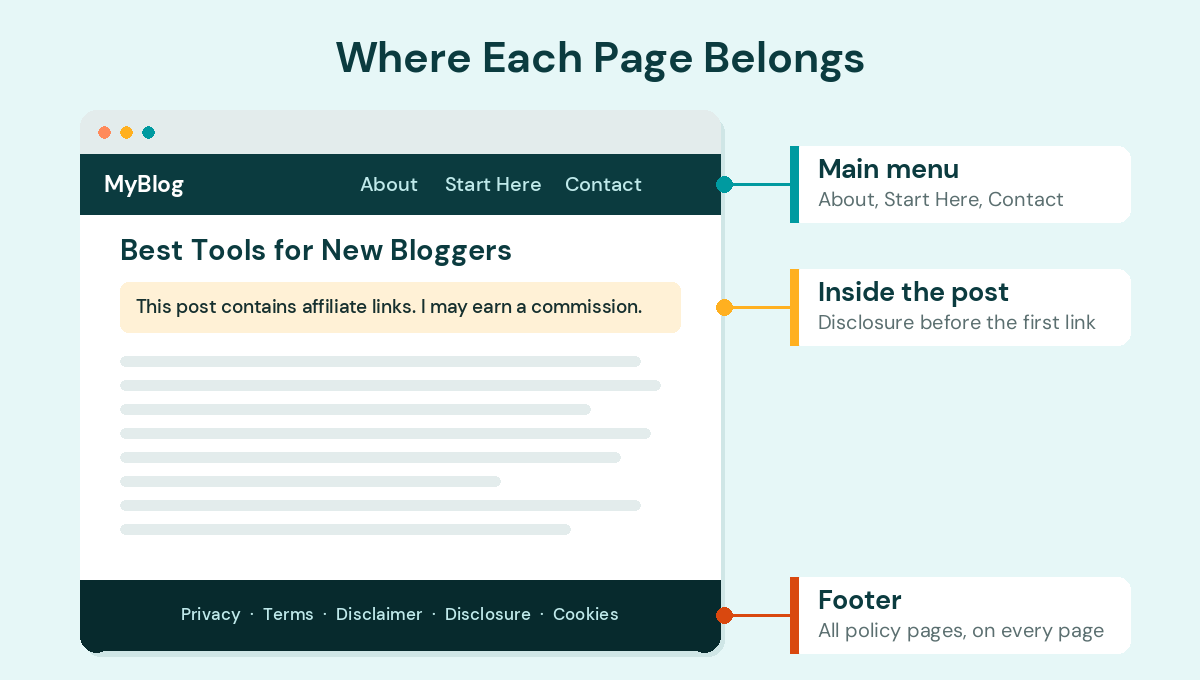
- Main menu: About, Start Here, and Contact. Keep it short.
- Footer: Privacy Policy, Terms and Conditions, Disclaimer, Affiliate Disclosure, and Cookie Policy. Footer links are visible on every page, which is what most policies require.
- Inside posts: your affiliate disclosure line, before the first affiliate link.
- Next to forms: a short “We respect your privacy” line linking to your Privacy Policy beside newsletter signups.
In WordPress, go to Appearance → Menus (or Appearance → Editor on block themes) to add pages to your header and footer.
Common Mistakes to Avoid
- Copying another site’s policies word for word. They won’t match your tools, and it’s copyright infringement.
- Leaving the WordPress Privacy Policy as a draft. It’s easy to forget to publish it after setup.
- Hiding the affiliate disclosure at the bottom of a post. Readers need to see it before they click.
- Never updating them. Add a new tool or ad network, update your Privacy Policy.
Frequently Asked Questions
Do I need a privacy policy if my blog doesn’t make money?
Usually, yes. If you use analytics, a contact form, comments, or a newsletter signup, you’re collecting personal data, and that alone can trigger privacy laws like GDPR for EU visitors.
Can I use a free generator for my blog policies?
Yes, generators from tools like Termly or the WordPress built-in template are a reasonable start. Edit the output so it matches the tools you actually use, and consider having a lawyer review it once your blog earns real income.
Which pages does Google AdSense look for?
AdSense requires a clearly displayed privacy policy that explains your use of cookies. Clear About and Contact pages also help reviewers see that your site is genuine and has original content.
Is one affiliate disclosure page enough?
No. Keep the full page, but also add a short disclosure inside each post that contains affiliate links, placed before the first link.
Set Up Your Blog Pages This Week
The important pages to add to your blog won’t bring traffic on their own, but they make everything else work better: readers trust you sooner, brands can reach you, and you’re ready when ad networks review your site.
Start with the six must-haves: About, Contact, Privacy Policy, Terms, Disclaimer, and Affiliate Disclosure. Then add the nice-to-have pages as your blog grows. If you’re still in the early stages, read our guide on how to pick a blog niche, and when you’re ready to grow your audience, see how to build an email list from scratch.
This article is general information, not legal advice. Privacy and disclosure rules vary by country, so check the requirements that apply to you.
Join the DigiSmart Skills newsletter for step-by-step tips on blogging, SEO, and building a website people trust. Learn. Build. Grow.